How to practice ATC before your first VATSIM flight
Plenty of simmers can fly an ILS to minimums and still freeze at the thought of keying the mic on VATSIM. That's normal. Flying is a skill you've practiced for hundreds of hours. Talking on a live frequency usually isn't, and nobody gets good at it by reading about it. This post covers what VATSIM expects from a new pilot, the radio skills worth practicing first, and a simple plan to get them before your first flight.
What VATSIM asks of you before you connect
The formal requirements are short. The current details are on VATSIM's Pilot Basics page, but in outline:
- Create an account at vatsim.net. As of January 1, 2026, new members must be at least 16.
- Work through the New Member Orientation Course and pass the short exam at the end. It covers the network's rules, what's expected of pilots, and basic ATC concepts.
- Install an approved pilot client to connect your sim. Most Microsoft Flight Simulator pilots use vPilot. VATSIM keeps a list of approved software.
- Connect while parked at a gate or on the apron, never on a runway or taxiway.
Beyond that, VATSIM expects you to know your aircraft and simulator and to be able to follow ATC instructions. Nobody expects polished radio work on day one. Being able to understand a clearance and read it back is what makes the first flight enjoyable instead of stressful.
The five radio skills to practice first
1. Picking your callsign out of the noise
On a busy frequency most transmissions aren't for you. The skill is half-listening to everything and snapping to attention when you hear your own callsign. It sounds easy, but it takes reps, especially when another aircraft has a callsign close to yours.
How to practice: fly with other traffic on frequency, and keep the transcript hidden once you're comfortable so you have to rely on your ears.
2. Copying a clearance the first time
An IFR clearance arrives as one fast transmission with five or six pieces of information in it. Pilots write it down in a fixed order, remembered as CRAFT: Clearance limit, Route, Altitude, Frequency for departure, and Transponder code. Draw five lines on a notepad, label them C, R, A, F and T, and fill them in as you hear them.
How to practice: ask for an IFR clearance on every practice flight, write it down without pausing anything, and read it back from your notes.
3. Reading back what matters
You don't repeat everything. You read back clearances and instructions that matter for safety: runway assignments, hold short instructions, altitudes, headings, frequencies and squawk codes, and you finish with your callsign. "Roger" only means "I received your transmission". It isn't a readback.
Tower: inFlight 17, runway 33, cleared for takeoff.
You: Runway 33, cleared for takeoff, inFlight 17.
4. Waiting for a gap
Only one person can talk on a frequency at a time. If you key up while someone else is transmitting, both calls are lost. Before you speak, listen for a second or two to make sure the frequency is clear and that the controller isn't waiting for a reply from someone else. Then say the call in one go. Work out what you're going to say before you press the button.
5. Knowing who to call next
A typical airline flight goes through clearance delivery, ground, tower, departure, one or more center sectors, approach, tower again and ground again. Each one wants a slightly different first call. On a handoff, you read back the new frequency, switch, and check in with the new controller, giving your altitude and, when climbing or descending, the altitude you're heading for.
Departure: inFlight 17, contact New York Center 132.17.
You: New York Center 132.17, inFlight 17.
You, on the new frequency: New York Center, inFlight 17, climbing through 14,000 for flight level 230.
On VATSIM, many positions are often unstaffed. When a controller above you is online, they cover the positions below them. Where nobody is online, pilots announce their intentions on Unicom, 122.800. Checking map.vatsim.net before you fly tells you who you'll actually be talking to.
Phraseology worth knowing cold
- Numbers. Say digits one at a time for frequencies, squawk codes and headings: "squawk one two three seven", "heading two seven zero". 9 is "niner".
- Altitudes. "Nine thousand", "one one thousand five hundred", and flight levels as digits: "flight level two three zero".
- Frequencies. "One two five point six five" in the US. Many other countries say "decimal" instead of "point".
- "Say again". Ask for it whenever you miss something. It's always better than guessing.
- "Unable". Use it when you can't comply with an instruction, and say why if you can.
- "Wilco". It means "will comply". It doesn't replace a readback when one is required.
A two-week practice plan
This assumes a few evening flights a week. Go faster or slower as you like. The point is to say the calls out loud many times before anyone is listening.
Days 1 to 3: learn the flow
Fly short legs between two airports you know, an hour or less. Use a tool that shows you the full exchange, and read every call out loud as you make it, even if you're clicking it. You're learning the order of things: who you call, when, and what they'll say back.
Days 4 to 7: use your voice
Switch to push-to-talk and say every call. Hide the transcript for the clearance and copy it onto paper. Fly the same route twice in a row, and notice how much easier the second one is.
Days 8 to 14: fly like you're on the network
Voice only, no prompts. Pick busier airports so you have to wait for gaps. Add an unfamiliar arrival or a VFR flight with flight following. In the last few days, fly the exact route you plan to fly on VATSIM, so the first real flight feels familiar.
Other practice that costs nothing
Listening is underrated. Recordings of real-world frequencies on LiveATC.net give you a feel for pace and phrasing. You can also connect to VATSIM and just listen to a busy frequency before you fly there yourself. Many VATSIM regions and divisions also run their own pilot training, which is worth a look.
Where inFlight ATC fits in
We built inFlight ATC as a practice tool for exactly this stage. It runs alongside Microsoft Flight Simulator 2020 or 2024 and gives you a busy frequency with other aircraft on it, controllers who use standard phraseology, and a push-to-talk button. When you speak, the app checks your words against the call that fits the moment, so you get used to saying it the standard way.
It has three modes that match the plan above. Beginner shows the full transcript and the exact words, and lets you click while you learn. Intermediate floats option cards over the sim only when it's your turn. Advanced is just a slim bar and your push-to-talk key, which is the closest to how it feels on the network.
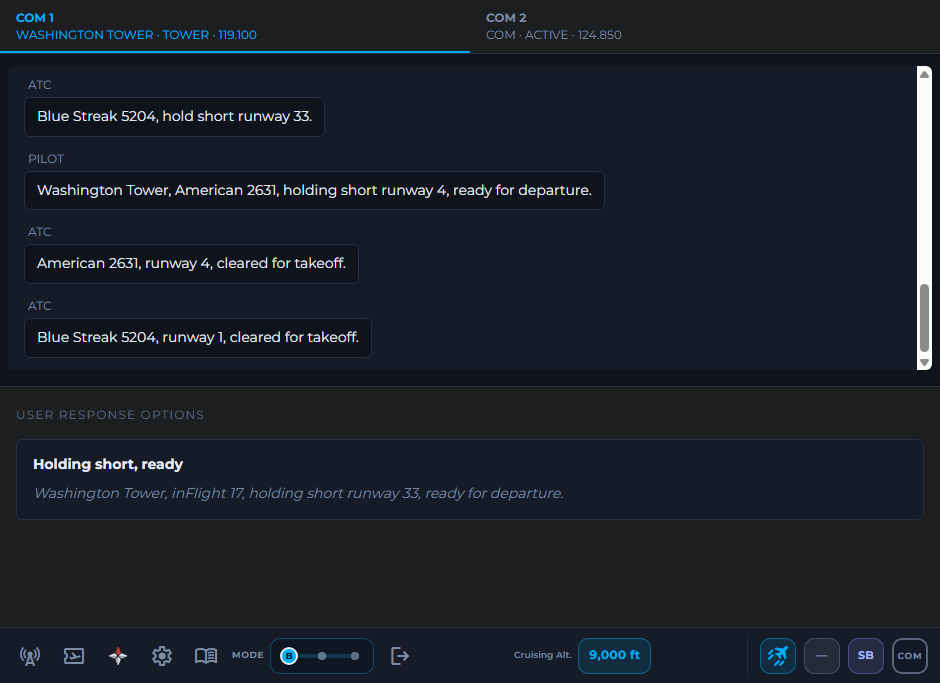
It's no substitute for real controllers. A person on VATSIM will improvise, ask you questions and occasionally get busy in ways software doesn't. What it gives you is repetition with no audience, at any hour, as many times as you need. You show up for that first flight already knowing the words.
Checklist for your first night on VATSIM
- Pick a quiet time and a medium-sized airport with a controller online, but avoid a big event night.
- File your flight plan ahead of time, through VATSIM's prefile page or your pilot client.
- Many new pilots write something like "new to VATSIM" in the flight plan remarks. Controllers often give a little extra patience when they see it.
- Have charts for both airports open, and a notepad ready for the clearance.
- Close any AI ATC add-on, including inFlight ATC, before you connect.
- Connect at a gate, tune the frequency, and listen for a few minutes before your first call.
- If you get lost, say so: "say again", "unable", or ask for progressive taxi instructions. Controllers would much rather help than have you guess.
Questions people ask
Do I need to be good on the radio before joining VATSIM?
No. VATSIM expects you to know your simulator and the basics of following ATC instructions, and its orientation course covers the rules. Controllers are used to new pilots. Some practice beforehand makes the first flight far less stressful, though.
Can I fly on VATSIM without using voice?
Yes. Text communication is allowed, and some pilots start that way. Most pilots use voice, and controllers can usually work voice traffic faster.
Can I use inFlight ATC while connected to VATSIM?
No. On VATSIM you talk to real people, so close any AI ATC add-on before you connect. Use inFlight ATC to practice beforehand.
How long should I practice before my first VATSIM flight?
Long enough that a clearance readback and a handoff feel routine. For many people that is a week or two of evening flights. There is no test for it, and you will keep learning on the network.
Start practicing tonight
Try inFlight ATC for 30 flight minutes: every frequency, every mode and push-to-talk. If you keep it, it's a one-time purchase with no subscription.
How the demo works