Choosing an ATC add-on for MSFS 2024, and setting it up
The ATC built into Microsoft Flight Simulator 2024 still works the way it always has. A window lists numbered lines and you click one. It will get you a clearance and a frequency, but it never hears your voice, and it won't teach you why a call is worded the way it is. That gap is why third-party ATC add-ons exist. This post covers what to look for in one and how to get it running for your first flight.
What an add-on should give you that the sim doesn't
The point of replacing the default ATC is to make the radio feel like part of flying again. In practice that comes down to a few things.
- Talking instead of clicking. You hold a button, say the call, and the controller answers.
- Real phraseology. Clearances, readbacks and handoffs worded the way pilots and controllers actually say them.
- A frequency with other people on it. Other aircraft calling in, so you have to listen for your callsign and wait your turn.
- Knowing your flight. Your route, your departure procedure and your cruise altitude, taken from your flight plan rather than guessed.
Eight things to check before you buy
1. Can you speak to it, and what happens when it mishears you?
Every serious add-on now has voice input. What separates them is the moment it gets something wrong. Look for a way to recover without alt-tabbing, like clicking the call you meant, and a way to test your microphone before the flight starts.
2. Where the voice processing runs
Some add-ons send your voice to a cloud service and stream the controller's reply back. Others do all of it on your PC. Cloud processing needs a steady connection the whole flight. Local processing needs CPU headroom. MSFS 2024 is heavy on memory, so look at the add-on's requirements next to the sim's, not on their own.
3. Subscription or one-time
Prices in this category run from a one-time purchase to around $190 a year. Neither is wrong, but work out what you'd pay over three years for the number of hours you actually fly. Our comparison of BeyondATC, SayIntentions.AI and inFlight ATC does that math for the three best-known options.
4. Gate-to-gate coverage
Check that it handles the whole flight: clearance delivery, ground, tower, departure, center and approach, and then taxi back to the gate. If you fly light aircraft, also check for VFR departures, flight following and non-towered fields, because some add-ons are built mostly around airliners.
5. Flight plan integration
SimBrief support is close to essential if you fly IFR. It also helps if the add-on can read the route you built on the MSFS World Map, so you don't have to plan the same flight twice.
6. Traffic on frequency
A frequency where you're the only aircraft gets dull fast. Look for an add-on that puts other aircraft on the radio and actually controls them, so a departure ahead of you is told to hold short while you're cleared to land.
7. VR and an in-sim panel
If you fly in VR, or just dislike switching windows, check whether the add-on has a panel you can open from the simulator's toolbar.
8. A way to try it
Voice recognition depends on your microphone, your accent and your room. Thirty minutes of real flying will tell you more than any review, so favor add-ons that let you try before you pay.
Setting up inFlight ATC with MSFS 2024
Here's the setup we'd suggest for a first flight with inFlight ATC. It takes about ten minutes, most of which is the first download.
- Install the app. Download the installer for Windows 10 or 11. It's a signed ClickOnce installer of about 180 MB. Windows SmartScreen may warn you the first time, since the app is new. Check that the publisher says Double5 Media LLC, then choose More info and Run anyway.
- Sign in. Create an account with your email and verify it. To try before buying, press "Try the 30-minute demo" on the sign-in screen. Your remaining time shows in the title bar.
- Start the sim at a gate. If you plan to use the in-game panel, open inFlight ATC first and then start MSFS 2024, so the panel is up to date. Load your flight parked at a gate or stand. You can also start on a runway or in the air, and the app works out which phase of flight you're in.
- Load a flight plan. Pull in your latest SimBrief plan with one click, or create a SimBrief plan from inside the app. You can also set your route on the World Map before you press Fly. Plans built in the cockpit EFB aren't picked up.
- Set up push-to-talk. Bind it to a keyboard key or a button on your yoke, throttle or gamepad, choose your microphone in the audio settings, and say a few calls on the Test PTT screen to see exactly what it hears.
- Pick Beginner mode for the first flight. You'll see the full transcript and the words for every call. Click to transmit, or hold push-to-talk and read the line out loud.
- Call clearance. Open the COM list, tune clearance delivery (or ground, at a field without one), and ask for your IFR clearance or VFR departure.
If the sim's own ATC voice gets in the way, turn its ATC volume down in the sim's sound settings.
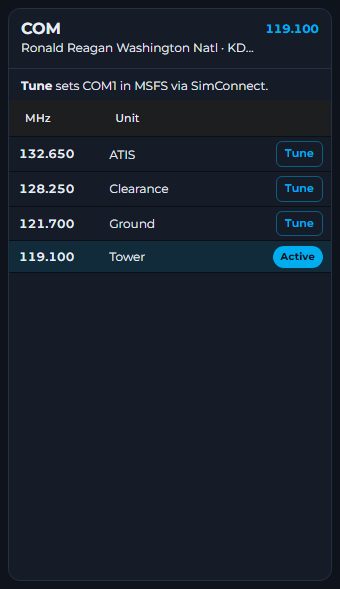
What your first IFR departure sounds like
Here's the start of a flight from Washington National to Kennedy with a SimBrief plan on the DOCTR5 departure. You'll hear other aircraft on each frequency between these calls.
You: Washington Clearance, inFlight 17, IFR to Kennedy, request clearance.
Clearance: inFlight 17, stand by.
Clearance: inFlight 17, cleared to Kennedy via the DOCTR5 departure, then as filed. Climb and maintain 9,000. Departure frequency 125.65. Squawk 1237.
You: Cleared to Kennedy via the DOCTR5 departure, then as filed, climb and maintain 9,000, departure 125.65, squawk 1237, inFlight 17.
Clearance: inFlight 17, read back correct.
The clearance is spoken once, at normal speed, like it would be on a real frequency. Keep a notepad handy and write it down in order: clearance limit, route, altitude, frequency, squawk. Pilots remember that order as CRAFT. If you miss a part, ask for a "say again". The app can also set the squawk on your transponder for you, or you can leave that to yourself.
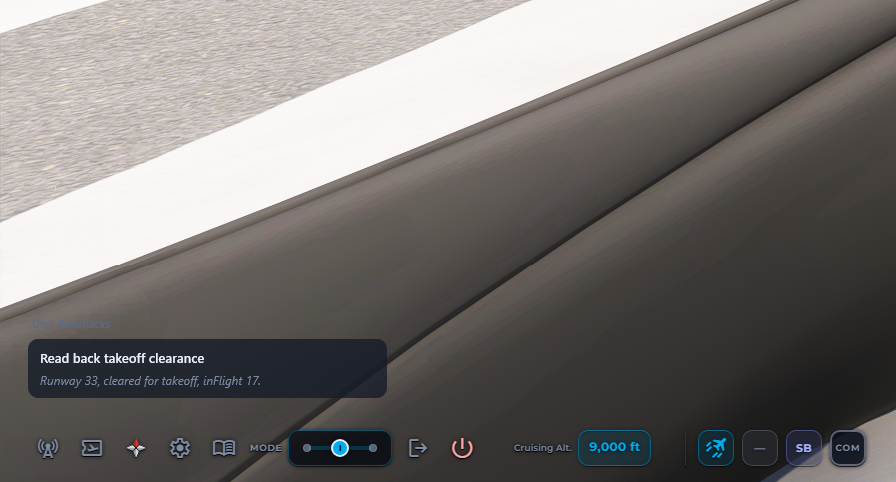
From there, ground gives you a taxi route and draws it on the taxi map, tower clears you for takeoff, and you're handed to departure, then center, then approach, and back to ground once you've landed.
Performance on MSFS 2024
inFlight ATC runs its voices and speech recognition on the CPU and adds no load to your graphics card. Alongside MSFS 2024 we recommend a 6-core CPU or better (8 cores is more comfortable), 32 GB of RAM and 6 GB of free disk space. With MSFS 2020, 16 GB of RAM is enough. The full list is in the system requirements.
Questions people ask
Does inFlight ATC work with both MSFS 2024 and MSFS 2020?
Yes. It connects to both, on Windows PC, whether you bought the sim on Steam or the Microsoft Store. Xbox is not supported.
Will an ATC add-on lower my frame rate in MSFS 2024?
inFlight ATC runs its voices and speech recognition on the CPU and adds no GPU load. With MSFS 2024 we recommend 32 GB of RAM and a 6-core CPU or better.
Can I use inFlight ATC in VR?
Yes. Install the toolbar panel from Settings, then VR in the app, and open inFlight ATC from the simulator's toolbar. You can see what ATC said, pick your reply and talk without leaving the cockpit.
Do I have to talk into a microphone?
No. In Beginner mode you can click your transmissions while you learn the words, and switch to push-to-talk whenever you are ready.
Try it on your next flight
The 30-minute demo is the full app, with every frequency, every mode and push-to-talk. Buying later unlocks the same account with no reinstall.
How the demo works