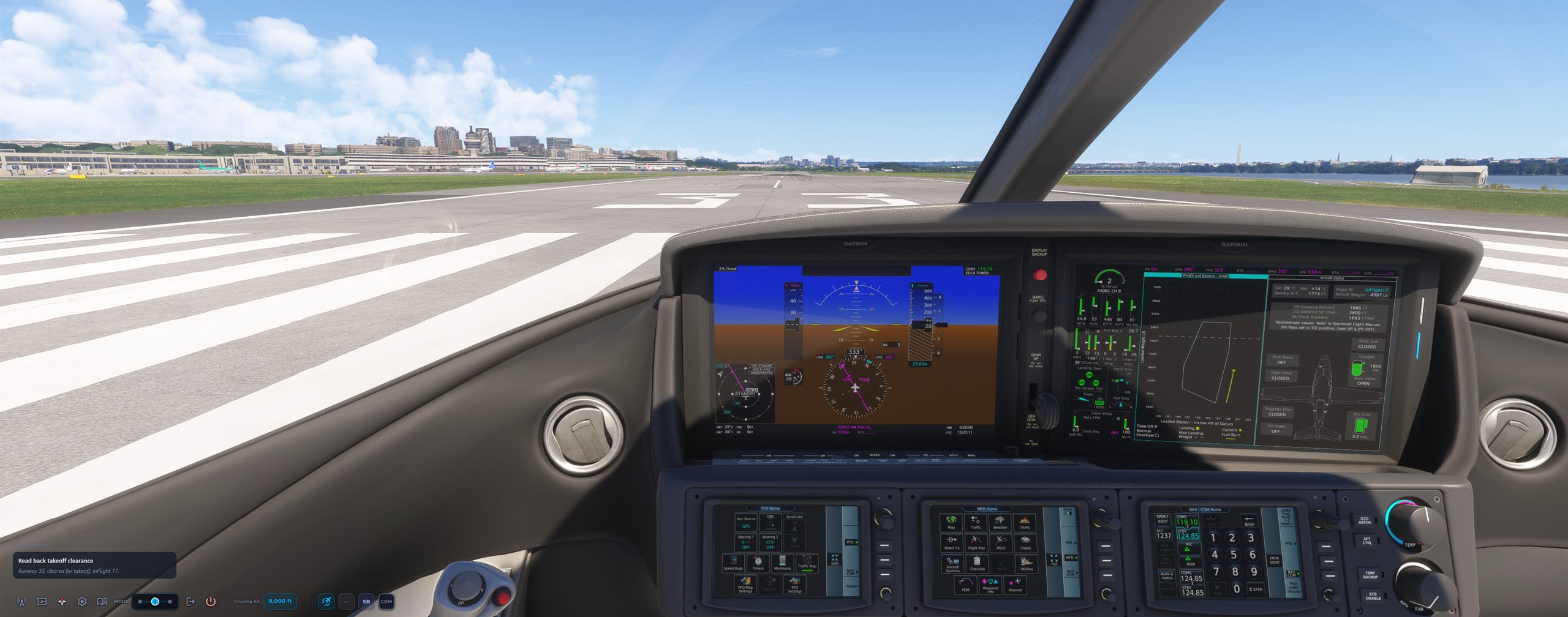
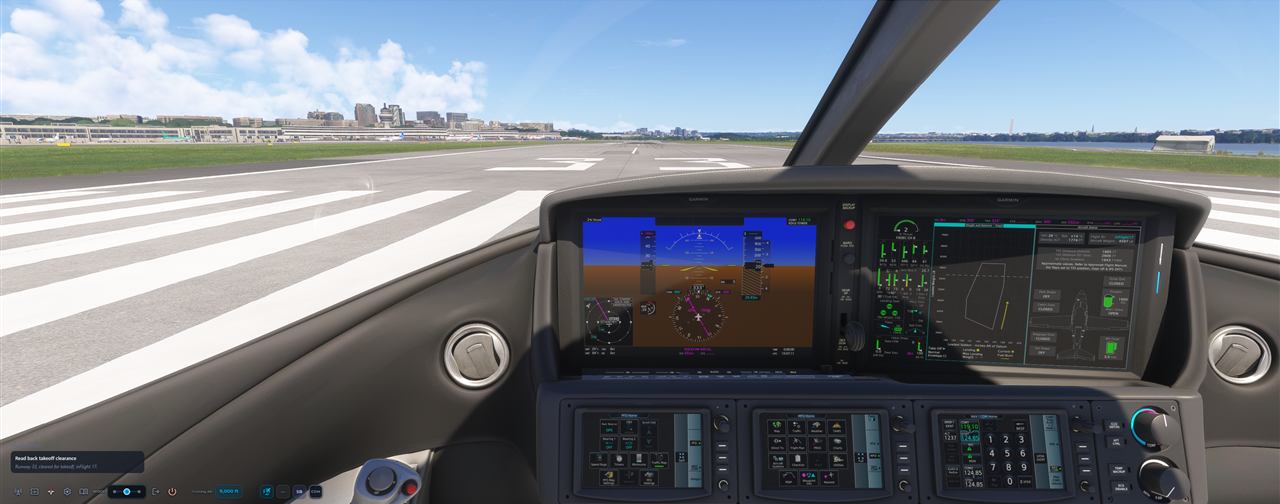
Microsoft Flight Simulator 2024 cockpit lined up on runway 33 at Washington National with the inFlight ATC readback card on screen
KDCA TWR  inFlight 17, runway 33, cleared for takeoff.

The tower is talking.
To you.

inFlight ATC gives Microsoft Flight Simulator a living frequency — real phraseology, real handoffs, traffic that answers around you. Hear your own callsign in the stream, copy the clearance, and key up like you've done it for years.

One-time purchase. No subscription. No per-word voice fees. MSFS 2024 & 2020.

The problem

You built the cockpit.
Then you flew it in silence.

A study-level aircraft. A yoke, pedals, three monitors. And a radio that never says your name. The one thing missing from your simulator is the thing real pilots use most — the frequency.

COM1 119.100 WASHINGTON TOWER TX BUSY

Every line above is from a real inFlight ATC session at KDCA — live traffic calls, hold-shorts, handoffs — and the sound is the app's actual controller and pilot voices. Your callsign is in there too. That's the difference.

Realistic AI air traffic control

Hear your callsign on a living frequency.

inFlight ATC brings realistic air traffic control to Microsoft Flight Simulator 2024 and 2020. Controllers address your aircraft by callsign while issuing clearances, runway instructions, traffic advisories, and handoffs using authentic aviation phraseology.

Practice callsign recognition and radio readbacks before flying on VATSIM, or simply make every flight more immersive. Play six real controller calls recorded directly from an inFlight ATC session at Washington National.

WASHINGTON TOWER · 119.100COM1

INFLIGHT 17, runway 33, cleared for takeoff, wind 320 at 8.

▶ plays the app's real controller voices, recorded straight from the app — a different controller on every call.

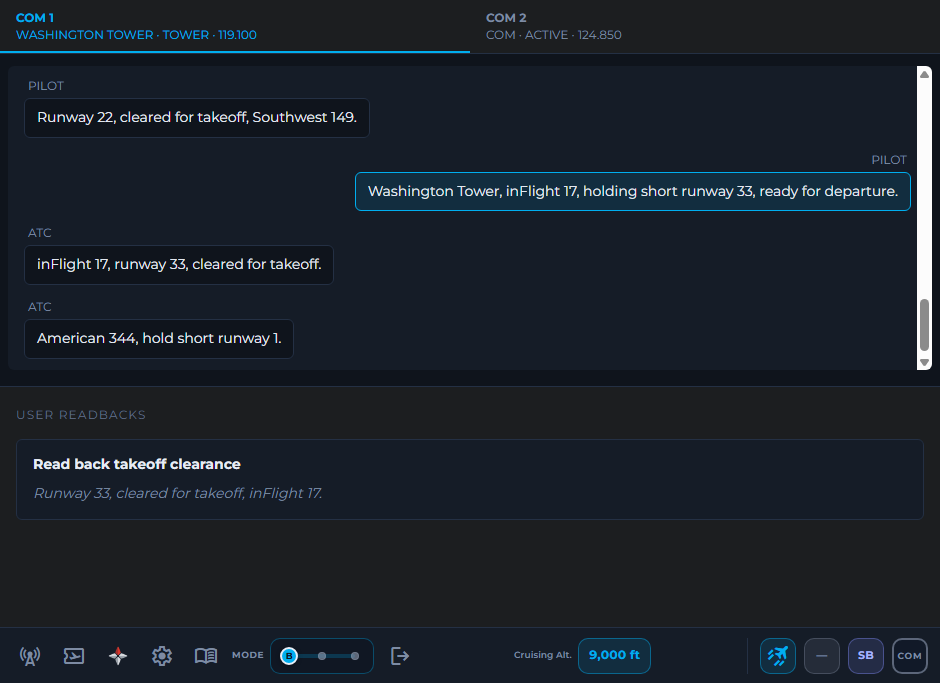
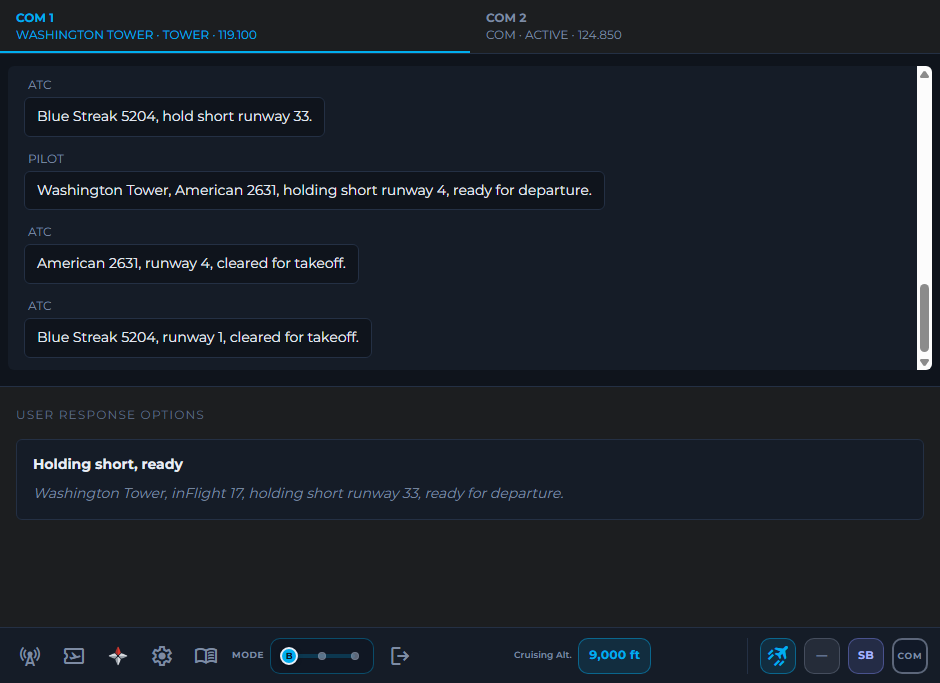
inFlight ATC Beginner mode showing a live Washington Tower transcript and a takeoff clearance readback card for callsign inFlight 17
A living frequency

Traffic that talks. Controllers that remember you.

You're not the only aircraft on frequency. American departs runway 4. Brickyard holds short. Southwest checks in ready. You wait for a gap — because the channel goes BUSY when someone else keys up, exactly like the real thing.

Then it's your turn: "inFlight 17, runway 33, cleared for takeoff." Read it back. Fly it.

  • Full gate-to-gate coverage: clearance, ground, tower, departure, center, approach
  • Live traffic on your frequency with real airline callsigns
  • IFR clearances, VFR departures, flight following, go-arounds, handoffs
  • Channel discipline — transmit while it's busy and you'll get stepped on
CCleared to Kennedy as filed
RDOCTR5 departure, then as filed
AClimb 9,000
FDeparture 125.65
TSquawk 1237
Real-world discipline

You'll only hear it once.
Learn to write it down.

On a real frequency there's no pause button. inFlight ATC delivers your IFR clearance the way Clearance Delivery does — once, at speed, while the frequency stays alive around you. Grab a pen. Copy the CRAFT. Read it back.

Miss something? Ask for a say-again, like a real pilot would. That tiny jolt of pressure is the exact skill that makes VATSIM feel easy later.

The app even sets your assigned squawk on the aircraft transponder for you — or leave it manual and set 1237 yourself, for the full workload.

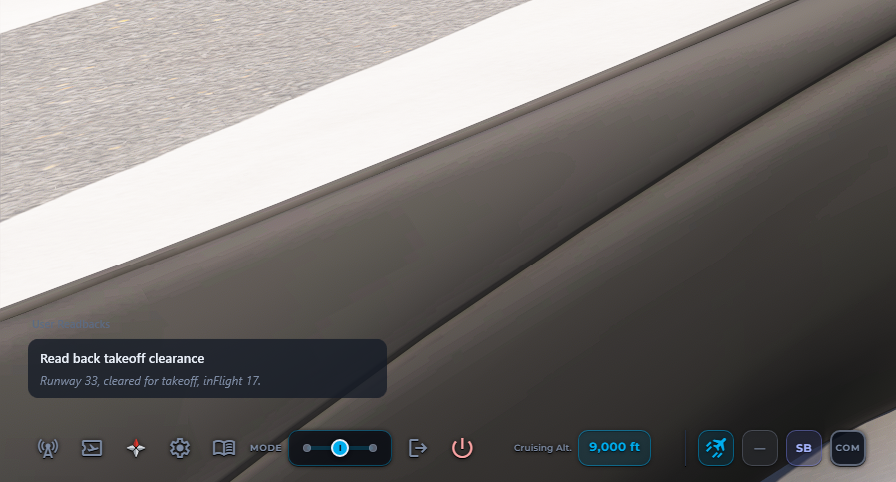
Translucent inFlight ATC HUD floating over the Microsoft Flight Simulator cockpit with a takeoff clearance readback card
Zero alt-tab

It lives inside your sim view.

No second monitor required, no window juggling. The translucent HUD floats over Microsoft Flight Simulator — a slim menu, and option cards that appear only when the radio needs you, then get out of the way.

  • Click-through translucent overlay — the sim stays in control
  • Knows your flight — position, radios, and transponder, live from the sim
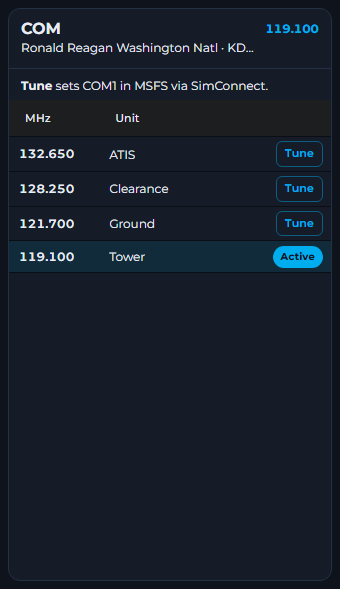
  • Tune COM1 in the sim from the app's frequency list — or app-only tuning
  • Readback "Pushback approved" and the tug actually pushes you back
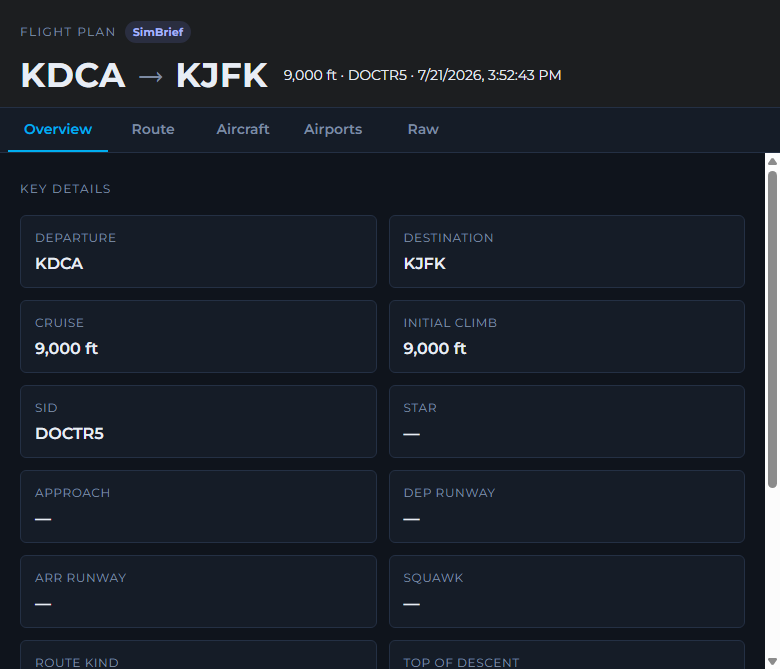
inFlight ATC flight plan window showing a SimBrief KDCA to KJFK plan with the DOCTR5 departure
It knows your flight

SimBrief in. Clearance out.

One click pulls your latest SimBrief OFP — or the plan you filed in MSFS. ATC clears you to your destination, on your SID, at your cruise. The trainer tracks your top of descent and starts talking you down when it matters.

Start anywhere, too. Load in at the gate, on the taxiway, or already at FL350 — the app auto-detects your phase and gives you the right frequency and the right words.

Three modes, one slider

From clicking to keying up.

Nobody is born knowing what "readback correct" means. inFlight ATC meets you where you are — and the mode slider moves the training wheels, mid-flight, whenever you're ready.

B

Beginner — read everything

The full radio window: live transcript, COM tabs, and clickable response cards with the exact words. See the flow. Click to transmit. Learn by doing.

Beginner mode: full transcript with clickable response options
I

Intermediate — heads up

A translucent HUD over the sim. Option cards float in only when it's your turn. More windshield, less window — the sim stays front and center.

Intermediate mode: translucent HUD cards over the cockpit
A

Advanced — just talk

A slim bar and your push-to-talk key. Hold, speak the call, release. The trainer matches your words to the frequency. This is how you'll fly on VATSIM.

Advanced mode: minimal slim menu bar for voice-only flying

Most pilots go B → I → A in about a week of evening flights. Then they book their first VATSIM flight.

Which pilot are you?

Three pilots. One frequency.

Every simmer we built this for is one of these three. Find yourself.

The Almost-VATSIM Pilot

Maya, 27 — 400 hours in the sim, zero on the mic

Maya can hand-fly an ILS to minimums. But she's hovered over the VATSIM "connect" button four times and never clicked it. What if she blanks when the controller calls? What if she says the wrong thing and everyone hears?

Two weeks of evening flights with inFlight ATC — Beginner, then push-to-talk. The night she finally connected to VATSIM, the clearance readback came out on autopilot. The controller just said "readback correct."

The Immersionist

Ray, 45 — flies the 737 like it's his job

Ray isn't training for anything. He has SimBrief, a home cockpit, and forty minutes after the kids go to bed. He just wants the world outside the flight deck to be alive — a frequency with other airplanes on it, a controller who knows where he's going.

Now his evening leg starts with ATIS and a clearance, and somewhere over Pennsylvania a controller hands him off to Center. He hasn't touched the mode slider past Intermediate. He doesn't need to. It's his world now.

The Student Pilot

Kenji, 19 — PPL student, radio-shy

Kenji's instructor keeps saying the same thing: "Your flying is fine. Your radio needs work." Ground school teaches you the words — it doesn't give you reps. Airplane time is $200 an hour; he's not spending it practicing how to say "holding short."

He flies the pattern at his real home field in the sim, every night, radios only. By his stage check, the tower calls felt like muscle memory — because they were.

Maya, Ray, and Kenji are illustrated composite characters — three of the thousands of ways simmers fly. The screenshots everywhere else on this page are the real product.

The graduation

Practice here. Fly the real network.

VATSIM, PilotEdge, and POSCON are the summit of flight simulation — real humans, live frequencies, zero pause button. inFlight ATC is your training camp:

  • Callsign recognition — pick your call out of a busy frequency, every flight
  • Copy once, read back — clearances at real cadence, no replay
  • Frequency discipline — wait for the gap, don't step on transmissions
  • Phase awareness — who to call, when, and exactly what to say
  • Mic confidence — hundreds of push-to-talk reps before your first live key-up

Not affiliated with VATSIM, PilotEdge, or POSCON — just the best warm-up act they've ever had.

inFlight ATC COM frequency window for Ronald Reagan Washington National with ATIS, Clearance, Ground, and Tower frequencies
Pricing

Everyone else charges rent.
You'll own this.

AI ATC subscriptions run up to $190 every year, forever. inFlight ATC doesn't meter your voices or bill you by the word — so we can charge you once and never again.

What you get Default MSFS ATC Subscription AI ATC inFlight ATC
Price Included Up to $190 / year, forever $39.99 once
Real phraseology & readbacks
Built to train you for VATSIM Immersion-first ✓ Beginner → voice progression
Controller voices Metered or subscription ✓ Unlimited, included
Clickable options while you learn Menus, no teaching ✓ With the exact spoken script
Cost over 3 years $0 (and silence) Up to $570 $39.99. Still.
Launch pricing — locks in forever

inFlight ATC for Microsoft Flight Simulator 2024 & 2020

$49.99 $39.99

One-time purchase. Yours for good.

  • Every frequency, gate to gate — clearance to taxi-in
  • Live AI traffic on frequency, real airline callsigns
  • Push-to-talk voice + clickable training modes
  • SimBrief & MSFS flight plan integration
  • Unlimited controller voices — no metering, ever
  • All future updates included
Download for Windows

Windows 10/11 · MSFS 2024 or 2020

Questions

Before you push back.

Does it work with MSFS 2024?

Yes — inFlight ATC connects directly to both MSFS 2024 and MSFS 2020. It knows your position, radios, and transponder, auto-detects your flight phase, and can tune COM1 and trigger pushback inside the sim.

Will it actually prepare me for VATSIM?

That's the core mission. You'll learn to catch your callsign on a busy frequency, copy clearances you only hear once, read them back correctly, and respect channel discipline — with hundreds of low-stakes reps before your first live key-up. Start in Beginner mode reading every word; graduate to push-to-talk.

Is there a subscription? Voice fees?

No and no. Pay $39.99 once, own it, and fly unlimited hours with unlimited controller voices. Updates included.

I've never talked to ATC in my life. Is this for me?

Especially you. Beginner mode shows you the full transcript and gives you clickable cards with the exact words — you learn the rhythm before you ever touch a microphone. The built-in user guide explains every button in plain language.

Do I need SimBrief?

No — it's optional but great. With SimBrief (free) the app pulls your OFP in one click, so clearances match your real route and cruise. It also picks up plans filed inside MSFS, or you can just fly VFR and use flight following.

What if I miss a call or say the wrong thing?

Ask for a say-again, or read the transcript in Beginner and Intermediate modes. The frequency keeps moving, like the real world — but nobody's judging. That's the point of practicing here first.

Cleared for takeoff

The frequency is waiting.
Answer it.

Tonight, load your aircraft, press Start, and hear a controller say your callsign. You'll never fly silent again.

Get inFlight ATC — $39.99

One-time purchase · MSFS 2024 & 2020