BeyondATC and SayIntentions alternative: how the three MSFS ATC add-ons compare
We make inFlight ATC, so keep that in mind as you read. We've tried to get the facts about BeyondATC and SayIntentions.AI right, using prices and details from their own websites as of October 2026, and we say plainly where each of them is the better pick. If anything here has gone out of date, email us and we'll correct it.
The short answer
All three replace the menu-driven ATC that ships with Microsoft Flight Simulator. They are built for different people, though.
- SayIntentions.AI suits you if you want ATC that copes with almost anything you say, plus extras like a virtual copilot, cabin crew and voices in several languages, or if you also fly X-Plane. You pay for it as a subscription.
- BeyondATC suits you if you want the lowest one-time price and traffic based on real flight data, and you don't mind an early access product that needs a live internet connection for its voices.
- inFlight ATC suits you if you want to learn the standard radio calls and say them out loud, you'd like the voices and speech recognition to run on your own PC, and you'd rather pay once.
Side by side
| SayIntentions.AI | BeyondATC | inFlight ATC | |
|---|---|---|---|
| How you pay | Subscription | One-time | One-time |
| Price | $18.95 a month, $105 every six months, or about $190 a year | $29.99 Base Pack, or $59.99 Supporter Pack with experimental builds | $39.99 ($19.99 with code DESCEND50 during the launch sale) |
| Rough cost over three years | About $570 on the annual plan | $29.99 or $59.99 | $39.99, or $19.99 on sale |
| Simulators | MSFS 2020 and 2024, X-Plane 11 and 12 (P3D on the Professional plan) | MSFS 2020 and 2024 | MSFS 2020 and 2024 |
| Where the voice work happens | Online service | Cloud, needs an active connection | On your PC's CPU |
| How you talk to ATC | Natural speech | Voice, or type | Push-to-talk voice, or click the line while you learn |
| Traffic | Traffic injection | Injects and controls traffic from historical flight data, or live with a Navigraph subscription | Works the sim's own AI traffic and puts it on frequency with airline callsigns |
| Trying it first | 24-hour trial | See their site | 30 flight minutes of the full app |
Competitor prices and features are taken from sayintentions.ai and beyondatc.net in October 2026 and can change. Check their sites before you buy.
SayIntentions.AI: the widest feature list
SayIntentions is the most ambitious of the three. Beyond ATC it offers a copilot, cabin crew, ground operations, traffic injection and voices in 15 languages, and it runs in X-Plane as well as MSFS. Its main strength is conversation: you can speak loosely and it will usually work out what you meant.
The trade-off is the cost. At $18.95 a month, or about $190 a year on the annual plan, it's priced like a service, because it is one. If you fly several nights a week and use the copilot and cabin features, that can be fair value. If you fly a couple of evenings a month and mainly want a tower that talks back, it adds up quickly. There's a 24-hour trial, so you can find out for yourself before you pay.
BeyondATC: cheapest to own, still in early access
BeyondATC costs $29.99 once for the Base Pack, which its FAQ says includes all core features and future updates. The $59.99 Supporter Pack adds access to the experimental branch. It injects and controls traffic based on historical flight data, or live traffic if you have a Navigraph subscription, and there's a toolbar panel for using it inside the sim, which VR pilots will appreciate.
Two things to know before you buy. First, it's an early access product, and its own FAQ warns that you should expect bugs and odd behavior while development continues. Second, its voices are cloud-based, so it needs an active internet connection to work, plus a SimBrief account. For many people neither is a problem. If your connection is patchy, it is.
inFlight ATC: built to teach you the radio
inFlight ATC was built as a practice tool for people heading to VATSIM, and that goal still shapes most of the design. Here's what's different.
It checks your call against the right call
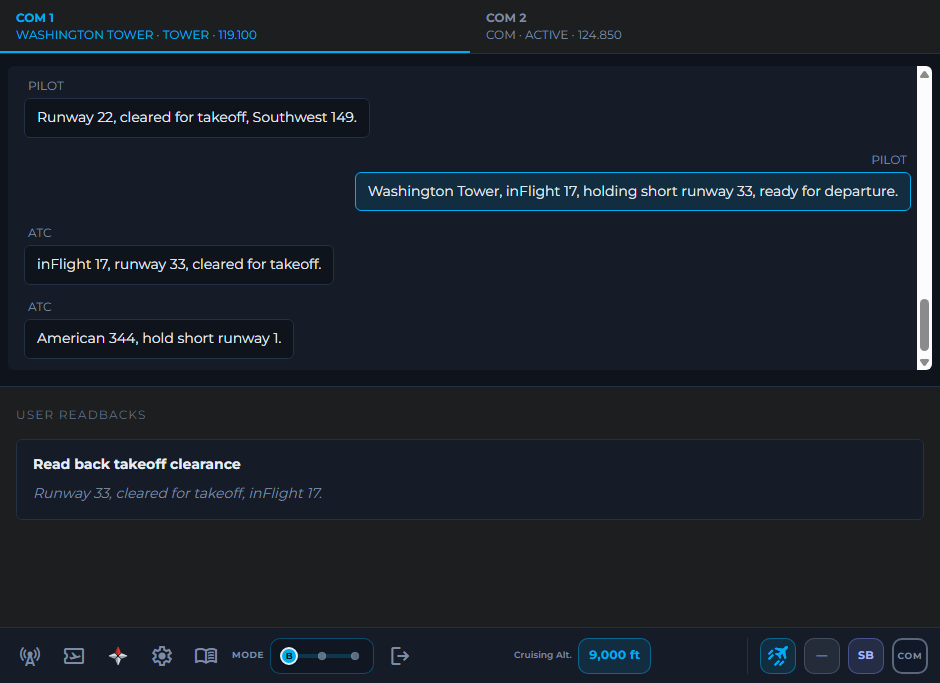
When you hold push-to-talk and speak, inFlight ATC doesn't try to make sense of anything you might say. It knows which calls fit that moment of the flight and matches your words against them. Say it correctly and it goes through. If it doesn't match, the options stay on screen and you can click the one you meant.
That's a deliberate limit. If you're learning, a system that accepts anything doesn't teach you much. Seeing the standard wording, hearing the controller use it back to you and saying it out loud is how it sticks. It also understands the way pilots actually talk, like "niner" and the phonetic alphabet.
Everything runs on your computer
The controller voices and the speech recognition run locally on your CPU. Your graphics card stays with the sim, your microphone audio isn't uploaded anywhere, and since there's no cloud bill behind each transmission, there's nothing to meter. The app goes online to sign you in, check for updates and fetch SimBrief plans.
Three modes as you get better
Beginner shows the full transcript and lets you click your transmissions. Intermediate is a see-through overlay with option cards that appear only when it's your turn. Advanced is a slim bar and your push-to-talk key. You can switch mid-flight, so it's easy to drop back a level on an unfamiliar arrival.
Gate to gate, on a busy frequency
You get clearance, ground, tower, departure, center and approach, plus VFR departures, flight following, go-arounds and non-towered fields. Center handoffs use the sector boundaries and frequencies from the sim's own data, so they work worldwide. Ground and tower also work the sim's AI traffic, so you hear other aircraft on frequency and have to wait for a gap before you key up.
What it doesn't do
It's English only. It runs on Windows PC with MSFS 2020 or 2024, and not on Xbox or X-Plane. It has no copilot or cabin crew. Our sister product, inFlight Addon, covers passenger and crew sounds if that's what you're after. And because it expects standard phraseology, it's a poorer fit if you'd rather chat with ATC in plain English.
Can you run two of them together?
We wouldn't. Each add-on wants to work your flight, so you end up with two controllers talking over each other and two sets of instructions. Pick one per flight. Switching between flights is fine.
How to decide in one evening
Fly the same short IFR hop with each one you're considering. Something like Washington National to Kennedy works well: a clearance, a departure procedure, a couple of handoffs and a busy arrival in under an hour. While you fly, pay attention to three things:
- Did you understand the clearance the first time, and did you know what to say back?
- Did it understand you, and when it didn't, could you recover without leaving the cockpit?
- How did the sim run? Watch your frame rate and memory use with the add-on going.
Then think about the price over a year or three, not just this month.
Questions people ask
Is inFlight ATC a subscription?
No. inFlight ATC is a one-time purchase with no monthly fee and no per-word voice charges. Updates are included.
Does inFlight ATC need an internet connection?
It uses the internet to sign you in, check for updates and fetch SimBrief plans. The controller voices and the speech recognition run on your own PC, and your microphone audio is not uploaded. The 30-minute demo needs a connection while you fly.
Does inFlight ATC work with X-Plane?
No. inFlight ATC supports Microsoft Flight Simulator 2020 and 2024 on Windows PC only. If you fly X-Plane, SayIntentions.AI supports it.
Can I run two ATC add-ons at the same time?
We do not recommend it. Each add-on will try to work your flight, and you end up with two controllers talking over each other. Pick one per flight.
Fly 30 minutes with inFlight ATC
The demo is the full app: every frequency, every mode and push-to-talk. Download it, sign in, and press "Try the 30-minute demo". If you buy later, the same account unlocks with no reinstall.
How the demo works